Roku Overheating or Solid Red Light? What to Do Before Using It Again
An overheating message or a steady red light on a Roku player calls for a pause in use. Do not keep restarting it to see whether the picture returns. First disconnect power carefully—the player may be hot—then check where it has been running.
This guide covers external Roku players and Streaming Sticks with the warning described by Roku. It does not interpret every status light on a Roku TV or explain repairs inside a television.
Quick Answer
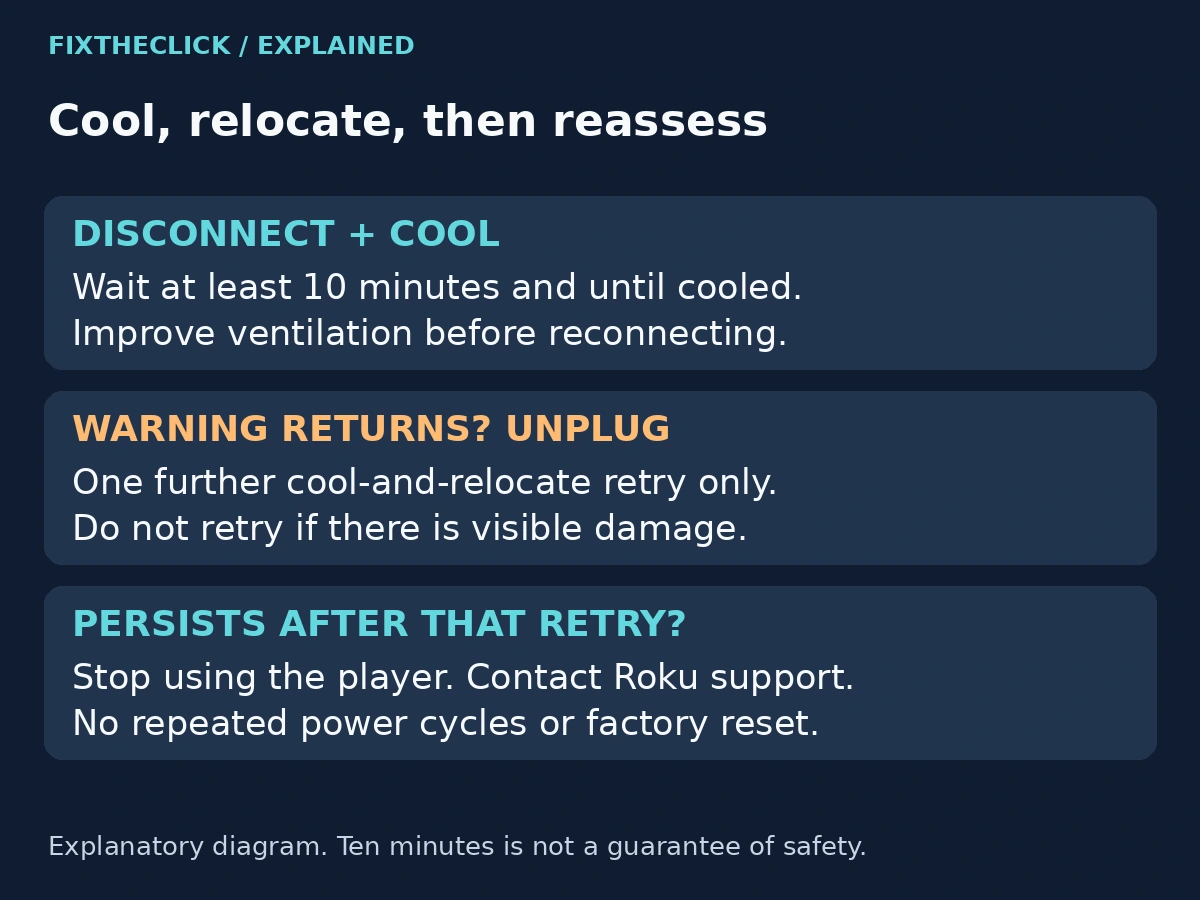
For a Roku overheating warning or solid red indicator, carefully unplug the player, improve its ventilation, and let it cool for at least 10 minutes. Reconnect only after it has cooled. If the warning returns, unplug immediately. Roku permits one further cooling-and-placement attempt; if the problem continues, stop using the player and contact support. Visible damage, smoke, or melting means no further power-on test.
1. Identify the Warning Before Trying a Fix
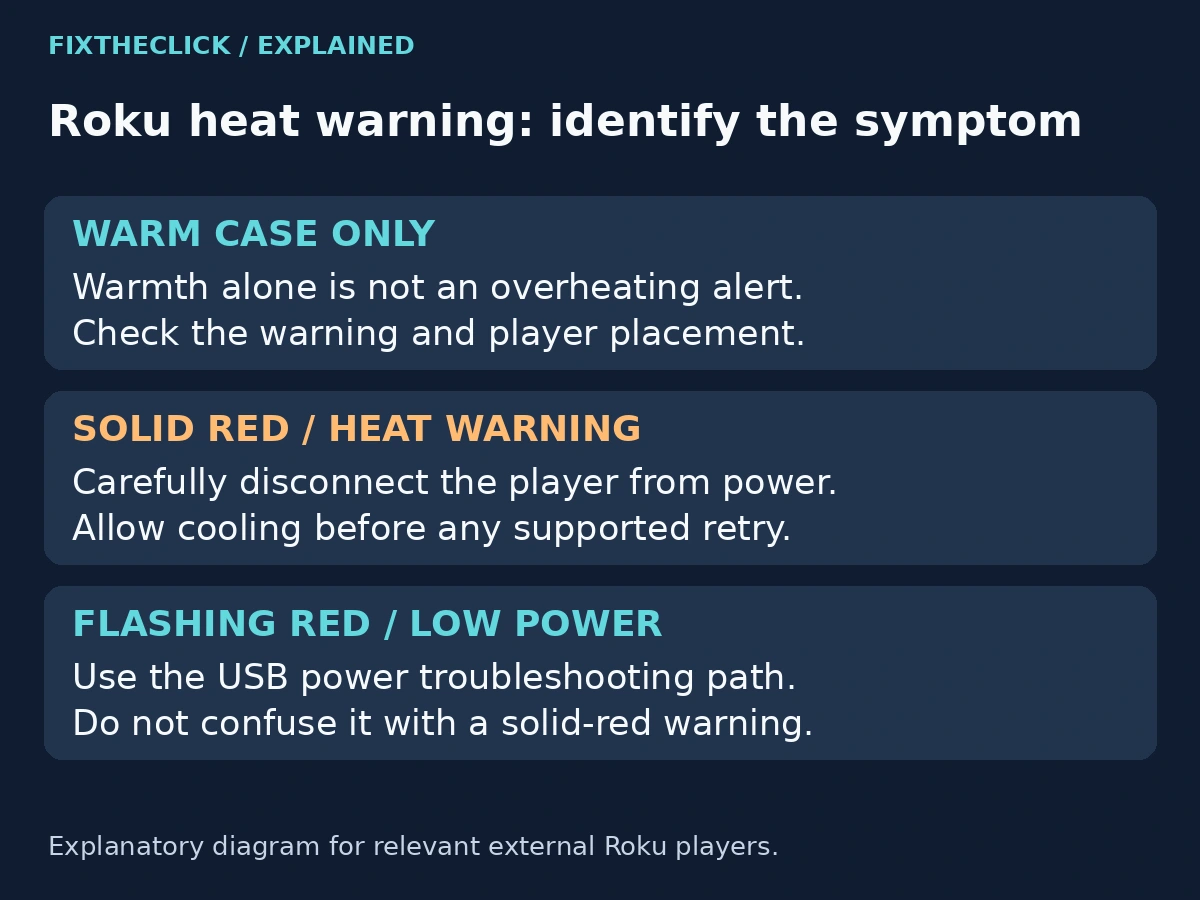
A warm case alone is not the same observation as an overheating message. Roku's red-light guide distinguishes a steady red indicator from a flashing one on the players it covers. The difference changes what you should do next.
| What you notice | What to do next |
|---|---|
| Warm housing, without a warning or unusual damage | Check placement; warmth alone does not establish overheating |
| Steady red light or an overheating message | Disconnect power carefully and follow the cooling procedure |
| Flashing red or an insufficient-power message | Check the separate low-power guidance for your player |
| Smoke, melting, burn damage, or a damaged power cable | Stop use; do not reconnect for a diagnostic test |
If the light flashes instead of staying solid, use our Roku low-power warning guide. Its short restart procedure is not the cooling procedure for an overheated player.
Read the television's message as well as looking at the light. If you cannot tell which condition occurred, leave the player disconnected while you identify the model and check its documentation. A red indicator on a television or remote is not enough to apply this player's instructions.
2. Disconnect Power and Give the Player Time to Cool
Follow Roku's overheating instructions. Carefully disconnect the player from power. Do not grab a hot housing or tug a hidden cable to get it out quickly.
Identify the power connection rather than only removing HDMI. On a Streaming Stick, the stick may plug directly into the TV's HDMI socket while a separate lead supplies power. Pulling an unrelated HDMI cable does not necessarily disconnect the player you are trying to cool.
Roku specifies at least 10 minutes of cooling before a guided retry. The player must also have cooled; a timer reaching ten minutes is not a safety test. Keep it disconnected if its condition gives you a reason not to handle or reuse it.
Let it cool naturally in a suitable location. Do not put it in a refrigerator, apply ice or water, open the case, or try to change internal cooling parts. Those are not steps in this troubleshooting procedure.
3. Fix the Placement Before Reconnecting
Cooling without changing a poor location leaves the same setup in place. With power disconnected, look at the space around the player and the surfaces touching it. Roku advises ventilation and keeping the device away from heat, direct sunlight, enclosed spaces, and soft surfaces.
Inside a cabinet: Check whether the player is enclosed with other warm equipment. Find an open, stable location allowed by its setup instructions. Do not simply close the cabinet again after the player cools.
Under something or on fabric: Remove objects covering the player. A cushion, blanket, or other soft surface is not an appropriate place to leave it running. Keep the surrounding space clear rather than hiding the unit under accessories.
Stacked with electronics: Separate the player from equipment producing heat. Note what was directly underneath or above it so you can describe the original arrangement if support is needed.
Behind the TV: Look for crowding or contact with a hot area without dismantling the television. Do not pull a wall-mounted TV forward or strain its connections just to reach the stick. If you cannot safely access the connection, get help with access before proceeding.
Roku mentions an HDMI extender as a possible way to move a Streaming Stick away from the television. Check the exact stick's compatibility and current availability through Roku. An extender changes placement; it does not prove that a damaged or repeatedly overheating player is safe.
4. Keep the Retry Bounded
Once the player has cooled and its placement is improved, reconnect according to its model's setup instructions. Watch for the same temperature message or steady red light rather than treating a normal-looking startup as a permanent fix.
If either warning returns, unplug immediately. Roku allows one further attempt following the same cooling and relocation steps. If the condition persists after that attempt, stop using the player and contact Roku support. Do not turn this into repeated cycles throughout the evening.
Keep track of whether you have already made that additional attempt. A simple note—“first retry: warning returned; second retry: warning returned”—is more useful than repeatedly starting over because the picture briefly came back.
Do not use a factory reset to move past this stopping point. Erasing accounts and settings does not check placement, remove visible damage, or establish that the player can be used safely.
5. Know When Not to Reconnect
Smoke, melting, burn marks, a damaged cable, or a broken connector are reasons to stop testing. Do not power the unit again just to photograph the warning or collect a software version.
For recurring overheating without visible damage, give support the player model, the exact message, whether the light stayed solid, and the location where it was running. Explain what changed during relocation and which retry produced the warning again.
Distinguish your observations from guesses. “The warning returned after moving it out of the cabinet” is useful. “The circuit board has failed” is a diagnosis these checks do not establish. Use Roku's official support route and the exact model's documentation for the next step.
Frequently Asked Questions
Is a Roku that feels warm always overheating?
No. Roku notes that its housing can become warm during use. Look for the overheating message or relevant solid-red indicator, while also paying attention to unusual heat or visible damage. Do not invent a safe temperature based on how the case feels.
Can I keep watching if the picture still works?
Not when the player is reporting overheating. A working picture does not cancel the warning. Disconnect it carefully and follow the cooling and placement checks.
Does ten minutes of cooling guarantee it is safe?
No. That is a minimum waiting period in Roku's procedure, not clearance to reuse damaged equipment. Recurring warnings and signs of damage have their own stopping points above.